Day 2: First Java Program
Input/Output, Datatypes and Type Casting

👨💻 Full Stack Developer in the Making | 🧠 DSA Enthusiast | 📚 Lifelong Learner | ✨ Passionate about Technology
📍 St. Joseph's Institute of Technology, 3rd Year
Types of Programming Language
Procedural
Contains a systematic order of statements, functions and commands to complete a task
Functional
Used in situations where we have to perform lots of different operations on the same set of data, like ML.
Object Oriented
Object-oriented programming centers around objects, which are instances of classes that encapsulate both data (attributes) and behaviors (methods).
Static vs Dynamic
| Aspect | Static Languages | Dynamic Languages |
| Early Error Detection | Offer early error detection | This may lead to runtime errors related to type mismatches |
| Performance | Better performance | Provide flexibility |
| Type Definitions | Require stricter type definitions | Offer flexibility |
| Common Languages | Java, C++, Swift | Python, JavaScript, Ruby |
| Selection Criteria | Project's requirements and developer preferences | Project's requirements and developer preferences |
Why Java?
Java is an excellent choice for learning Data Structures and Algorithms (DSA) because it offers strong support for object-oriented programming, which aligns well with DSA concepts, and its robust standard libraries provide a wide range of data structures and algorithms for practice and implementation. Additionally, Java's platform independence allows learners to focus on DSA principles without worrying about low-level system details.
Running Your First Java Programm - Hello, World!
To compile and run a Java file using the command prompt (cmd) on Windows, follow these steps:
Install Java (if not already installed):
- Make sure you have Java Development Kit (JDK) installed on your computer. You can download it from the official Oracle website.
Write Your Java Code:
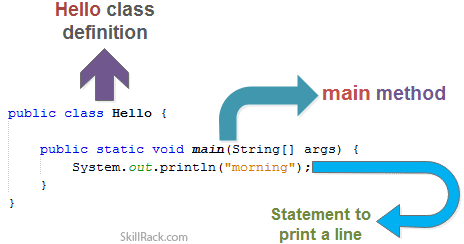
Use a text editor (e.g., Notepad) to write your Java code. Save the file with a ".java" extension. For example, you can create a file named "HelloWorld.java" with the following content:
    public class HelloWorld {
        public static void main(String[] args) {
            //Display Hello, World!
            System.out.println("Hello, World!");
        }
    }
Open Command Prompt (cmd):
- Press
Win + R, type "cmd," and press Enter to open the command prompt.
- Press
Navigate to the Directory Containing Your Java File:
- Use the
cd(change directory) command to navigate to the directory where your Java file is located. For example:
- Use the
cd path\to\your\java\file\directory
Compile the Java Program:
- Use the
javaccommand to compile your Java source file (replace "HelloWorld.java" with your file's name if different):
- Use the
javac HelloWorld.java
If there are no syntax errors in your code, this will generate a bytecode file named "HelloWorld.class" in the same directory.
Run the Compiled Java Program:
- To execute your Java program, use the
javacommand followed by the name of the class containing themainmethod (without the ".class" extension):
- To execute your Java program, use the
java HelloWorld
If everything is set up correctly, you should see the output of your program, which is "Hello, World!" in this case.
That's it! You've compiled and run a Java program using the command prompt. You can now create more complex Java applications and follow the same process to compile and execute them.
Inputs in Java
The Scanner class in Java is a useful utility for reading input from various sources, such as the keyboard (standard input), files, or strings. It is part of the java.util package and provides methods for parsing and tokenizing input. Here's an overview of how to use the Scanner class for input in Java:
Import the Scanner class:
To use the
Scannerclass, you need to import it at the beginning of your Java program:import java.util.Scanner;Creating a Scanner object:
You create a
Scannerobject to read input from a specific source. The most common source is the keyboard (standard input):Scanner input = new Scanner(System.in);This creates a
Scannerobject namedinputthat reads input from the keyboard (System.in).Reading Input:
You can use various
Scannermethods to read input based on the data type you expect. Here are some common methods:nextLine(): Reads a line of text (including spaces) as aString.nextInt(): Reads the next integer.nextDouble(): Reads the next double-precision floating-point number.nextBoolean(): Reads the next boolean value (true or false).next().charAt(0): Reads the next char value.next(): Reads individual words.Example:
  System.out.print("Enter your name: ");
  String name = input.nextLine();

  System.out.print("Enter your age: ");
  int age = input.nextInt();
Closing the Scanner:
It's a good practice to close the
Scannerwhen you're done with it to release any system resources it might be holding:input.close();However, in most simple console applications, it's not strictly necessary since
System.inwill still be open. But it's essential when dealing with other input sources like files.
Data Types in Java
Primitive Data Types (8):
byte: 1 byte, -128 to 127short: 2 bytes, -32,768 to 32,767int: 4 bytes, -2^31 to 2^31-1long: 8 bytes, -2^63 to 2^63-1float: 4 bytes, 7 decimal digitsdouble: 8 bytes, 15 decimal digitschar: 2 bytes, Unicode characterboolean: true or false
Reference Data Types:
Objects and references to objects.
String, Arrays, Custom Classes.
Wrapper Classes:
Convert primitives to objects.
E.g.,
Integer,Double,Boolean.
Casting:
Implicit (e.g.,
inttodouble).Explicit (e.g.,
(int) 3.14).
Literals:
Constants:
1,3.14,'A',true.Scientific Notation:
1.23e-4.
Type Conversion:
Widening (Implicit): Smaller to larger data type.
Narrowing (Explicit): Larger to smaller data type (may lose data).
String Data Type:
Sequence of characters.
"Hello, World!".Concatenation with
+.
Arrays:
Ordered collection of elements.
E.g.,
int[] numbers = {1, 2, 3};.
Enum Types:
User-defined data types with a fixed set of constants.
E.g.,
enum Days {MON, TUE, WED}.
Constants:
finalkeyword to create constants.E.g.,
final double PI = 3.14.
Default Values:
Primitives: 0 (or false for
boolean).References:
null.
Type Inference (Java 10+):
varkeyword for local variables.E.g.,
var num = 42;.
Remember that choosing the right data type is crucial for efficient memory usage and accurate data representation in your Java programs.
Type Casting
In Java, there are two main types of type casting: implicit casting (widening) and explicit casting (narrowing).
Implicit Casting (Widening):
Implicit casting occurs automatically when you assign a value of a smaller data type to a variable of a larger data type.
It's safe because there is no risk of data loss or loss of precision.
int intValue = 42;
double doubleValue = intValue; // Implicit casting from int to double
Explicit Casting (Narrowing):
Explicit casting is required when you want to convert a value of a larger data type to a smaller data type.
It may result in data loss or loss of precision, so you need to use a cast operator.
double doubleValue = 3.14;
int intValue = (int) doubleValue; // Explicit casting from double to int
Conclusion
In this insightful journey through the foundational concepts of Java programming, we've explored the various facets that make Java one of the most popular and versatile programming languages. From understanding the different types of programming languages to running our very first Java program, delving into input handling with the Scanner class, and comprehending the nuances of data types and type casting, we've laid a strong foundation for our coding endeavors.
Java, known for its robust support for object-oriented programming, is an ideal choice for learning Data Structures and Algorithms (DSA). It provides a seamless alignment between DSA concepts and object-oriented principles, allowing us to dive deeper into these critical areas of computer science.
As we continue this learning journey, we'll explore more intricate topics, build sophisticated applications, and embark on exciting coding challenges.
Stay tuned for the next chapter in our learning adventure, where we'll delve deeper into Java, tackle more advanced programming concepts, and work towards becoming proficient developers. Until then, happy coding!